 Excel template
Household Budget & Expense Tracker
Log income and expenses in one list. Monthly and annual summaries and budget vs actual by category update automatically. Plan savings goals and split each paycheck between bills and savings. Change the year to keep using the same file.
Opens the Gumroad product page. The price shown there is the one that applies.
Need more than one template? This one is also in the Excel Templates Bundle (all 4) on Gumroad: $19 instead of $30 bought separately.
Free lite edition (xlsx): 10 categories, 300 rowsDirect download, no sign-up. No budget vs actual, annual summary or planning sheets.
See how it works
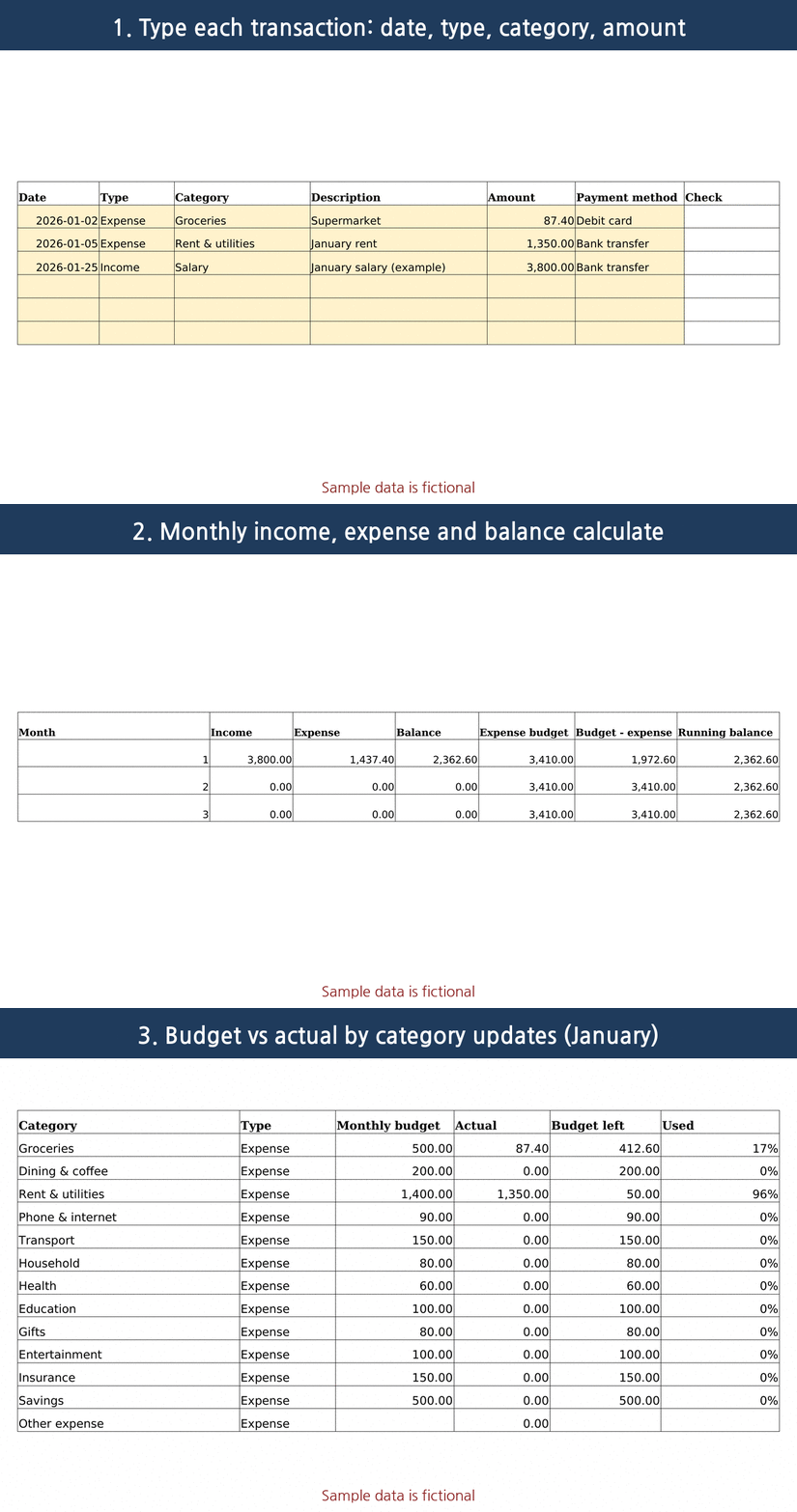
What the sheets look like
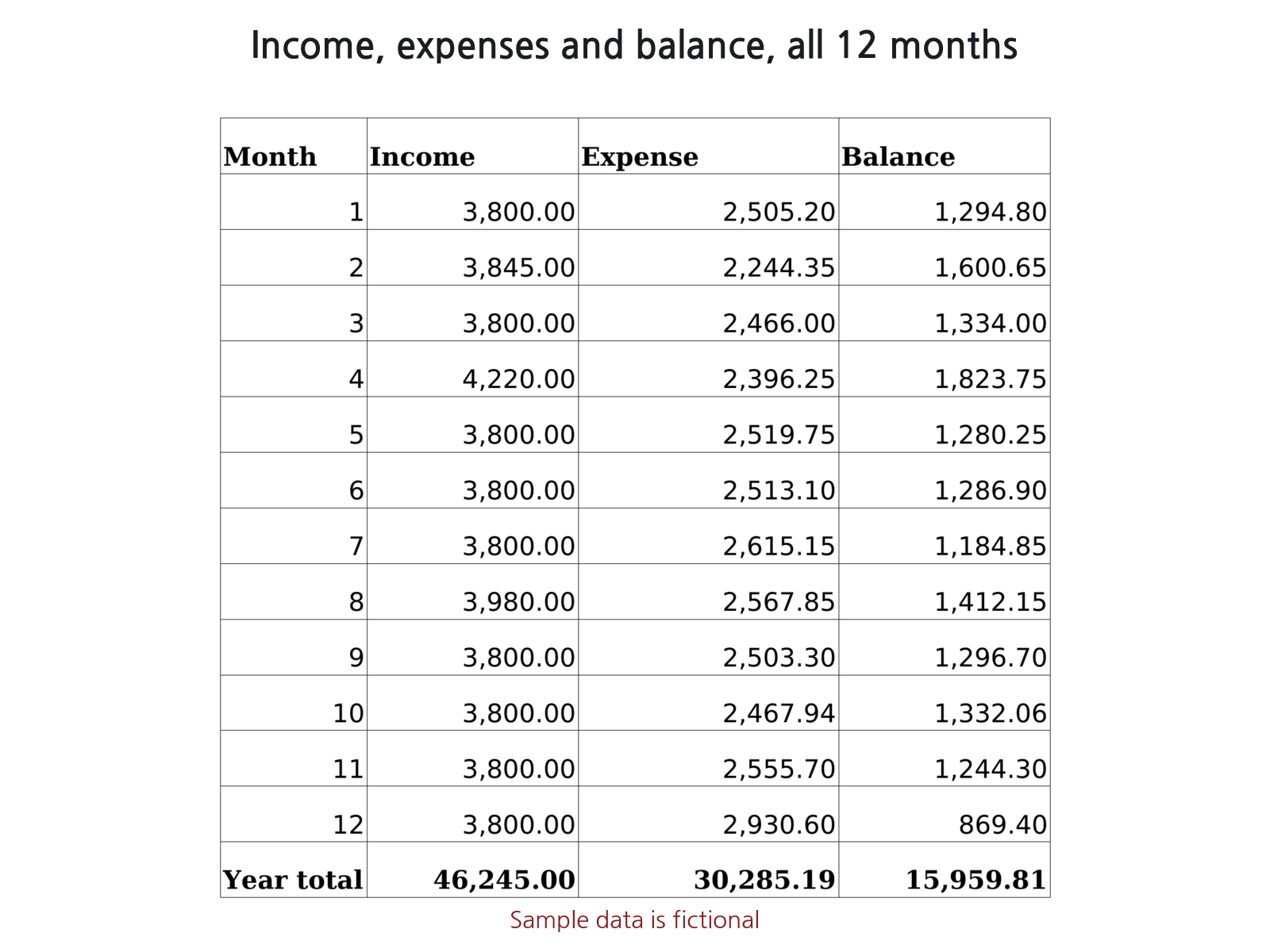
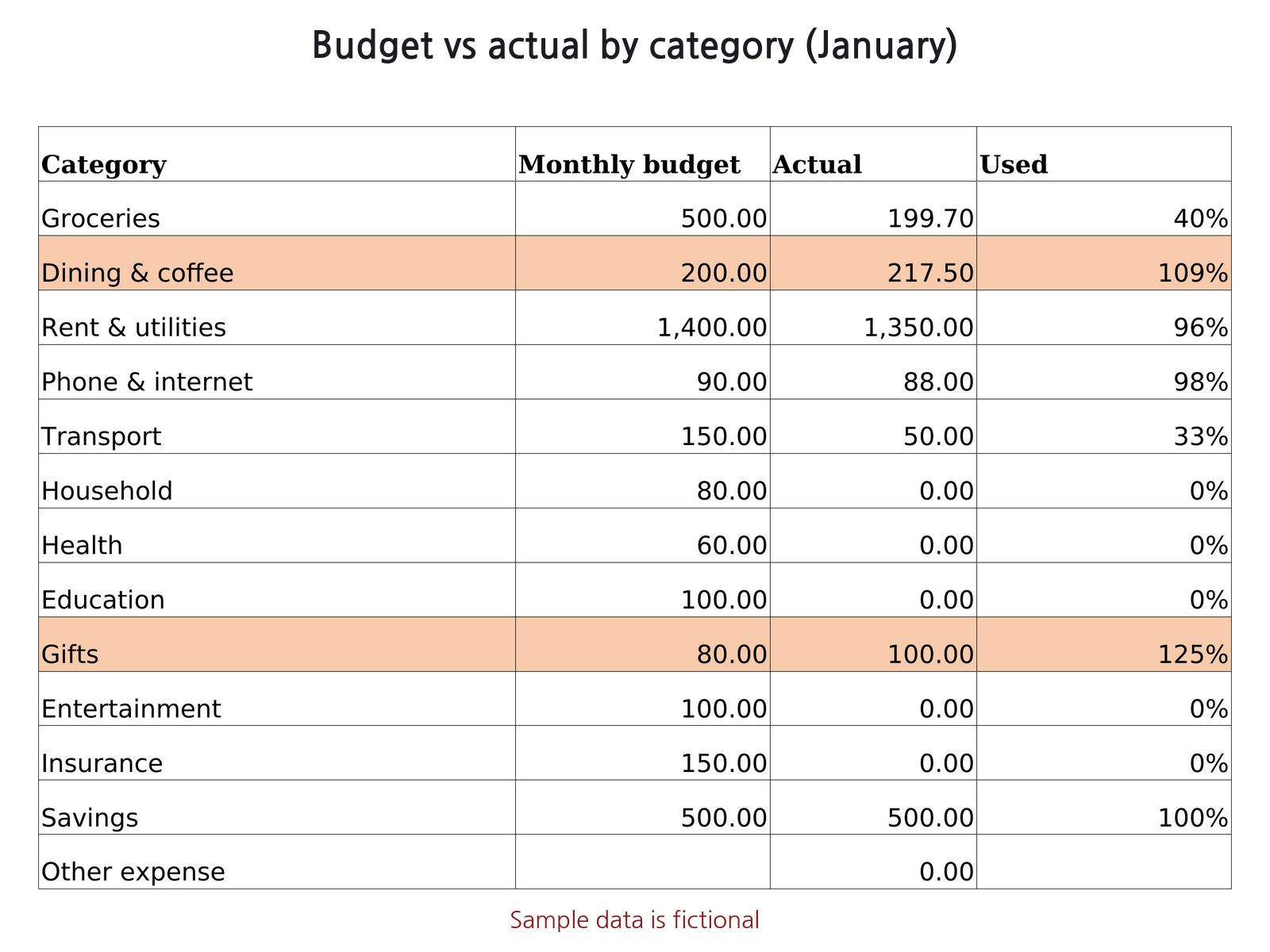
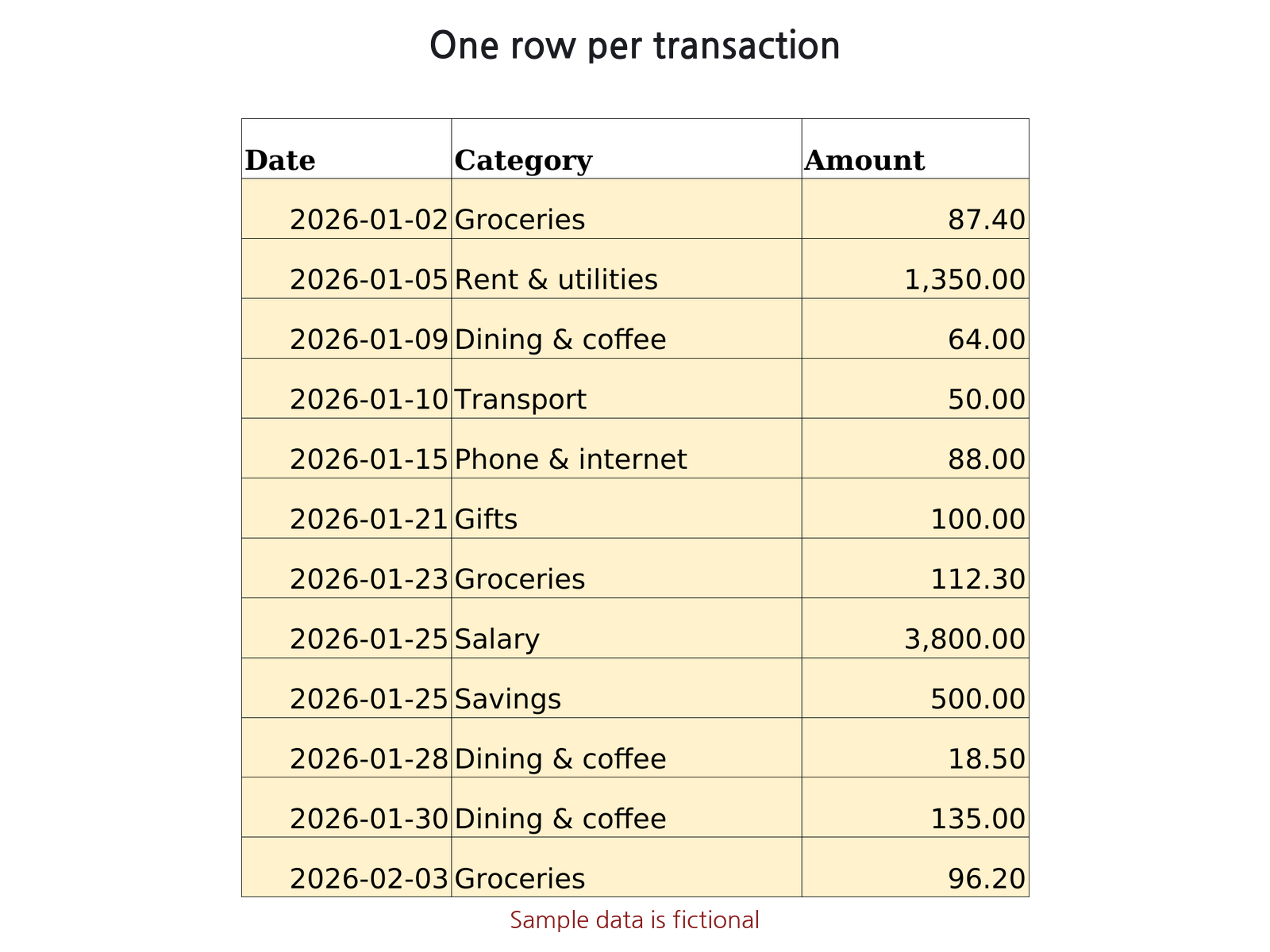
What it does
- Up to 50 categories (income or expense) with optional monthly budgets, plus editable payment methods.
- Transactions sheet (5,000 rows): date, type, category, description, amount, payment method, with dropdowns.
- A Check column flags rows with a non-date value, missing type, unknown category or type mismatch, and highlights them.
- Monthly summary: income, expenses, balance, budget vs actual and running balance for each month; category table for a chosen month with % of budget used. Over-budget categories are highlighted.
- Annual summary: every category by month, yearly total and yearly budget left.
- Records that do not match the category list are collected in Unlisted rows, so monthly totals still add up.
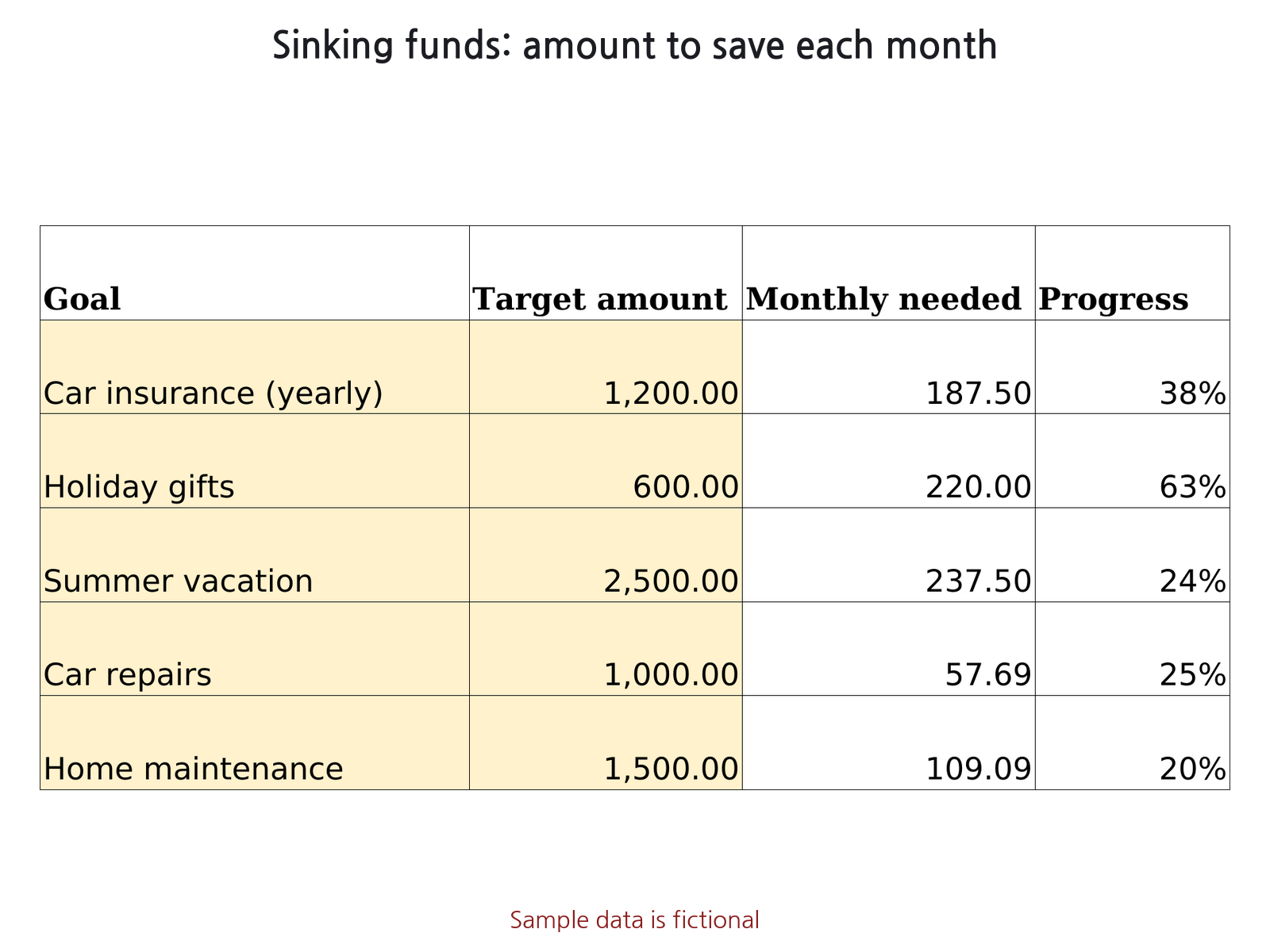
- Sinking Funds (up to 30 goals): target amount, target date and amount saved give the remaining amount, months left, monthly amount needed and % progress.
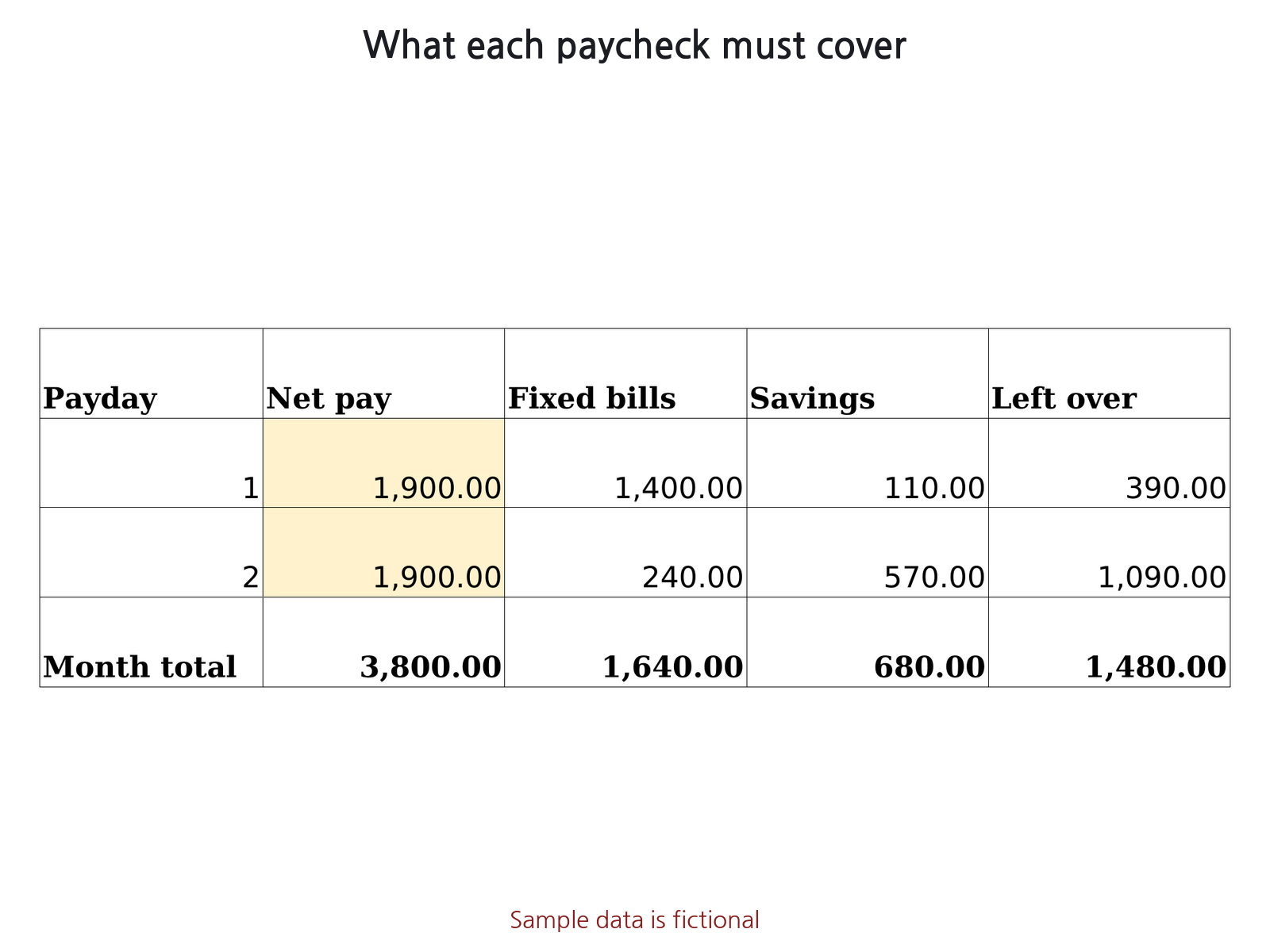
- Payday Budget: 1 to 4 paydays a month. Assign each fixed bill or savings transfer to a payday and see what is left from each paycheck.
- Sinking Fund Log (up to 30 funds, 2,000 log rows): record each deposit and withdrawal; balance, % progress, amount still needed, monthly amount needed and status are calculated per fund, with a balance vs target chart.
What it does not do
- Sinking Funds, Sinking Fund Log and Payday Budget are planning sheets; they are not linked to the transactions or summaries.
- No bank or card syncing, per-account balances, instalment splitting or tax calculations.
- Not tax or financial advice.
How to use
- On Settings, list your categories with their type (Income or Expense) and a monthly budget for expense categories. Yellow cells are inputs.
- On Transactions, enter one row per transaction. Type, category and payment method are picked from lists.
- If the Check column shows text, fix that row (it is highlighted).
- On Monthly summary, enter a year and a month. On Annual summary, enter a year.
- Optional: plan savings goals on Sinking Funds and split each paycheck on Payday Budget.
Sheets in the file
- How to use: steps and calculation rules
- Settings: categories, budgets, payment methods
- Transactions: your income and expense list
- Monthly summary: 12 months plus one month by category
- Annual summary: category x month for the year
- Sinking Funds: savings goals
- Payday Budget: bills and savings per paycheck
- Sinking Fund Log: deposits and withdrawals per fund
Compatibility
- Microsoft Excel: .xlsx file, no macros, uses functions common to Excel 2010 and later (SUMIFS, INDEX/MATCH). Not yet opened in Microsoft Excel by us.
- Free lite edition: opened on 2026-11-02 in Microsoft's Excel for the web viewer (no sign-in). All 4 sheets were listed, and the monthly Income, Expense, Balance and Running balance figures (12 months and year total) and the January category amounts matched our LibreOffice results. The full edition itself has not been opened in Microsoft Excel by us; editing was not tested.
- LibreOffice Calc: built and tested here. Every formula was recalculated in LibreOffice and compared with a separate calculation.
- Google Sheets: not tested in Google Sheets. Every function used is in Google's Sheets function list (static check only). Layout and column widths may look different.
Free guide and tool
- How to make a household budget in Excel (step by step) (free guide)
- How to make a sinking funds tracker in Excel (monthly amount per goal) (free guide)
- How to make a paycheck budget in Excel (bills and savings by payday) (free guide)
- Free Sinking Fund Calculator (runs in your browser)
FAQ
Does it work with my currency?
Amounts use the #,##0.00 format with no currency symbol, so any currency works. Dates are YYYY-MM-DD.
Can I use it next year?
Yes. Change only the year on the summary sheets and the same file keeps working.
Does it connect to my bank?
No. There is no bank or card syncing; you enter transactions yourself.
Household Budget & Expense Tracker
Excel file (.xlsx), no macros. USD 7 on Gumroad.
Get it on Gumroad · USD 7Digital download. If the file doesn't work for you, email within 30 days for a full refund.
Good to know
- Made with AI; formulas checked by automated tests. Built with Claude (AI); the tests recalculate the file in LibreOffice Calc and compare against a separate calculation.
- Not reviewed by an accountant or financial professional.
- Sample data in the file and screenshots is fictional.
- This page collects no personal data. No ads or cookies; Cloudflare Web Analytics (cookieless) counts page loads, and our server only counts daily page views and buy-button clicks per page and referring site (no IP address, no user agent).