
The idea: one row per goal, one log for every deposit
A sinking fund is money you put aside a little at a time for a cost you can see coming: a yearly insurance bill, car repairs, holidays, gifts. Spreading the cost over the months before it is due keeps it from landing on one month's budget. The tracker in this guide has three sheets:
- Funds: one row per goal with its target amount, target date and what you had already saved.
- Transactions: one row for every deposit into a fund and every withdrawal from it.
- Summary: the as of date and one monthly total for all funds.
The money itself can sit in one savings account. The funds only exist in the spreadsheet, which tells you how much of that balance belongs to each goal. The sheet adds up amounts you type; it does not move money or add interest, and it is not financial advice.
Step 1. List your funds
Create a sheet named Summary. Type As of in A1 and =TODAY() in B1. Every date calculation counts from this cell; type a fixed date there instead to see the plan as of another day.
Create a sheet named Funds with headers in A1 to L1: Fund, Target, Target date, Start balance, Deposits, Withdrawals, Balance, Progress, Still needed, Months left, Monthly needed, Status. You type only A to D, from row 2 down to row 31 (30 funds). Start balance is what you had already saved for that goal on the day you start the log; leave it empty if nothing. The target date can stay empty for a goal without a fixed date.
Keep fund names unique, without * ? ~ or a leading < > =: SUMIF reads those as wildcards or comparisons.
Step 2. Log every deposit and withdrawal
Create a sheet named Transactions with headers Date, Fund, Deposit, Withdrawal, Note, Check in A1 to F1. Enter amounts as positive numbers in the correct column. When the bill arrives and you pay it from the fund, log it as a withdrawal instead of changing the target or the start balance, so the log still explains every change. After paying a yearly bill, move its target date to next year so the fund starts saving again.
For a drop-down of funds, select B2:B2000, open Data > Data Validation, choose List and use =Funds!$A$2:$A$31 as the source. Pasted rows skip the drop-down, so fill this check down column F from row 2:
Transactions!F2=IF(AND(C2="",D2=""),"",IF(OR(B2="",COUNTIF(Funds!$A$2:$A$31,B2)=0),"Check fund",""))
It shows Check fund when the fund is blank or not on the Funds list. Those rows are not counted in any fund until you fix them.
Step 3. Balance, progress and amount still needed
On Funds, put these in row 2 and fill them down to row 31:
Funds!E2=IF(A2="","",SUMIF(Transactions!$B$2:$B$2000,A2,Transactions!$C$2:$C$2000))
Funds!F2=IF(A2="","",SUMIF(Transactions!$B$2:$B$2000,A2,Transactions!$D$2:$D$2000))
Funds!G2=IF(A2="","",D2+E2-F2)
Funds!H2=IF(OR(A2="",N(B2)<=0),"",G2/B2)
Funds!I2=IF(A2="","",MAX(0,B2-G2))
SUMIF adds every deposit (and every withdrawal) logged under this fund's name, whatever the date. The balance is the start balance plus deposits minus withdrawals. Still needed stops at 0 once the target is reached. Progress stays blank when the target is empty or 0.
Format column H as a percentage. For a quick visual, select H2:H31 and choose Home > Conditional Formatting > Data Bars. Then open Manage Rules > Edit Rule and set Minimum to Number 0 and Maximum to Number 1, so a full bar means 100% rather than "the largest value in the column".
Step 4. Months left and monthly amount
Funds!J2=IF(OR(A2="",C2=""),"",(YEAR(C2)-YEAR(Summary!$B$1))*12+MONTH(C2)-MONTH(Summary!$B$1))
Funds!K2=IF(J2="","",IF(J2<=0,I2,I2/J2))
Funds!L2=IF(A2="","",IF(G2>=B2,"Funded",IF(C2="","No date",IF(C2<Summary!$B$1,"Past due","Saving"))))
Months left counts calendar months from the as of month to the target month, so November to January is 2. The monthly amount is an even split of what is still needed over those months. When the target month is this month or already past, Months left is 0 or less and the whole amount still needed is shown instead of a division by zero. A fund without a target date gets no monthly amount and the status No date.
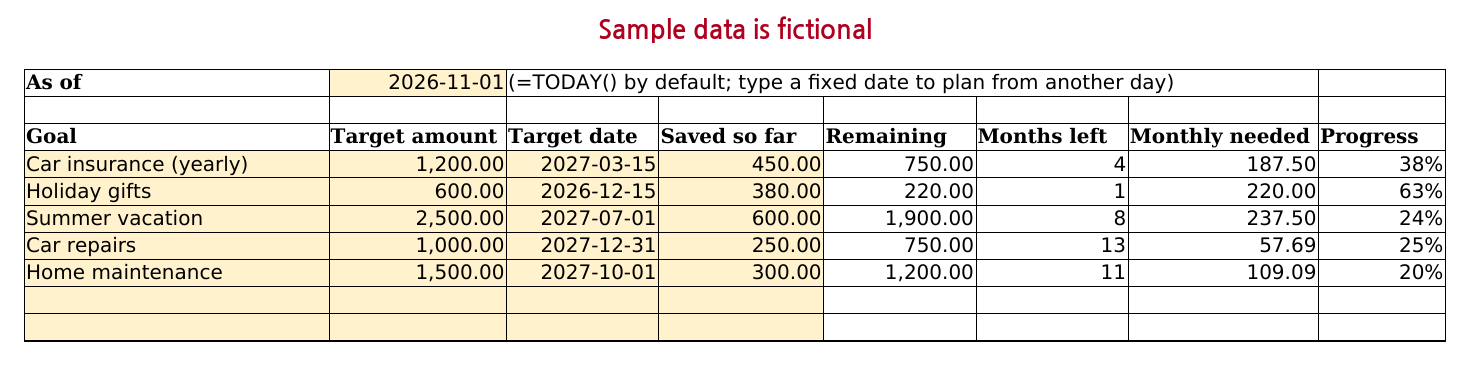
For example, a car insurance bill of 1,200.00 due on 2027-03-15 with 450.00 saved needs 750.00 more. As of November 2026 that is 4 months, so 187.50 a month. If you skip a month, the amount for the remaining months goes up by itself; nothing needs retyping. To try the numbers before you build anything, the free Sinking Fund Calculator uses the same month rule for several goals in your browser.
Step 5. One monthly total for your budget
On Summary, type the labels Month start, Total target, Total balance, Monthly needed, Deposits this month and Funds past due in A2:A7, then:
Summary!B2=DATE(YEAR(B1),MONTH(B1),1)
Summary!B3=SUM(Funds!B2:B31)
Summary!B4=SUM(Funds!G2:G31)
Summary!B5=SUM(Funds!K2:K31)
Summary!B6=SUMIFS(Transactions!$C$2:$C$2000,Transactions!$A$2:$A$2000,">="&$B$2,Transactions!$A$2:$A$2000,"<"&EDATE($B$2,1),Transactions!$F$2:$F$2000,"<>Check fund")
Summary!B7=COUNTIF(Funds!L2:L31,"Past due")
B5 is the number to carry into your monthly budget as one line, for example a category called Sinking funds. Funds that are already funded or have no date add nothing to it. B6 adds this month's deposits from the first of the as of month up to, but not including, the first of the next month, and skips rows marked Check fund so it agrees with the balances. When B6 reaches B5, this month's saving is done. B4 is what your savings account should hold for these goals, which makes it easy to compare with your bank balance.
Common problems
- A target date has passed: the fund shows Past due and the whole amount still needed. Type a new target date or a lower target; the log stays as it is.
- You spent part of a fund early: log a withdrawal. The balance drops and the monthly amount for the remaining months goes up.
- The cost changed: retype the Target. Still needed, progress and the monthly amount follow.
- A deposit is missing from a fund: the name in the log has an extra space or a different spelling. Use the drop-down and look at Check. Capital letters do not matter to SUMIF.
- Deposits this month is 0: the dates are text, or B1 on Summary holds an old typed date.
Common questions
How much should I put in a sinking fund each month?
There is no single right amount; it depends on what the cost is and when it is due. The tracker uses one rule: (target - balance) / months left, counting calendar months to the target month (Step 4). A 1,200.00 bill due in 4 months with 450.00 saved needs 187.50 a month. The target itself is your own estimate, for example last year's bill or a quote. The free Sinking Fund Calculator does the same split for several goals and adds them into one monthly total.
Do I need a separate bank account for each sinking fund?
Not for this tracker. It keeps each fund's balance on paper, and Total balance on the Summary sheet (Step 5) is what all funds should add up to, so you can compare it with one savings account. Separate accounts work too if you prefer them; the sheet does not change.
Prefer a ready-made file?
This page gives you a working tracker. If you would rather start from a finished file, our paid Household Budget & Expense Tracker has two sinking funds sheets next to its transaction list and monthly budget: Sinking Funds (up to 30 goals with a typed amount saved so far) and Sinking Fund Log (up to 30 funds and 2,000 deposit and withdrawal rows, with balance, progress, monthly amount needed, status and a balance vs target chart). Both are planning sheets and are not linked to the transactions or summaries. The free lite edition of the budget does not include them.
Household Budget & Expense Tracker on Gumroad · USD 7Need more than one template? This one is also in the Excel Templates Bundle (all 4) on Gumroad: $19 instead of $30 bought separately.
Screenshots and details of the template
Free Sinking Fund Calculator (runs in your browser)