
The idea: plan by the day the money arrives
A monthly budget tells you that this month's income covers the rent, not whether the paycheck that arrives before the rent is due is big enough. A paycheck budget answers that: every bill and every savings transfer is paid from one specific paycheck, and each paycheck shows what is left after its share.
One sheet, two tables:
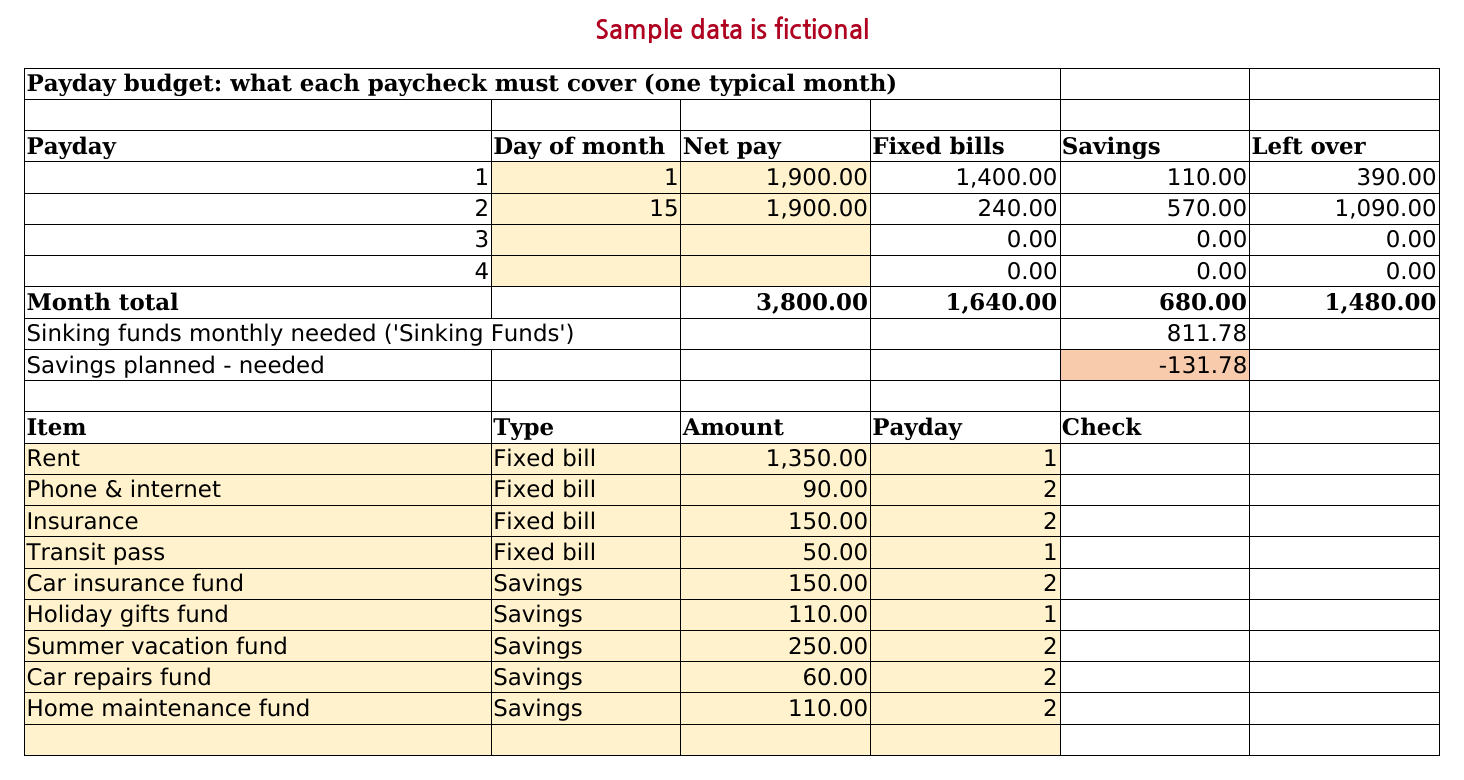
- Paydays (rows 4 to 7): up to four paychecks in a typical month, with the take-home pay of each.
- Bills and savings (rows 13 to 62): one row per fixed bill or savings transfer, with the payday that pays it.
The sheet plans one typical month. It does not read your bank account or track what you actually spent, and it is not financial advice.
Step 1. Enter your paydays
Create a sheet named Payday Budget. Type the headers Payday, Day of month, Net pay, Fixed bills, Savings, Left over in A3 to F3. In A4:A7 type the numbers 1, 2, 3 and 4, and type Month total in A8. The bills point to these numbers, so leave them as they are.
For each paycheck in a typical month, type the day it arrives in column B and your take-home pay (after tax and deductions) in column C. Paid on the 1st and the 15th? Fill rows 4 and 5 and leave rows 6 and 7 blank. Day of month is a note for you; no formula reads it. To catch typos, select B4:B7, open Data > Data Validation and allow a whole number between 1 and 31.
Step 2. Give each bill and savings transfer a payday
Type Item, Type, Amount, Payday and Check in A12 to E12. From row 13 down to row 62 (50 rows), enter one row for each fixed bill (rent, phone, insurance) and each savings transfer you make on payday (an emergency fund, a sinking fund). Type is either Fixed bill or Savings. Amount is what that paycheck pays toward it in a typical month.
A simple rule for the payday: the last paycheck that arrives before the due date. With paydays on the 1st and the 15th, rent due on the 5th goes to payday 1 and a phone bill due on the 20th goes to payday 2.
For drop-downs, select B13:B62, open Data > Data Validation, choose List and type Fixed bill,Savings as the source; do the same for D13:D62 with 1,2,3,4. Pasted rows skip drop-downs, so fill this check down column E from row 13:
E13=IF(AND(A13="",B13="",C13="",D13=""),"",IF(AND(B13<>"Fixed bill",B13<>"Savings"),"Check type",IF(ISNA(MATCH(D13,$A$4:$A$7,0)),"Check payday",IF(INDEX($C$4:$C$7,D13)="","Payday has no pay",""))))
It shows Check type when Type is neither Fixed bill nor Savings, Check payday when Payday is blank or not 1 to 4, and Payday has no pay when the payday has no net pay entered. To highlight those rows, select A13:E62, choose Home > Conditional Formatting > New Rule > Use a formula and enter:
=$E13<>""Step 3. Add up each paycheck's bills and savings with SUMIFS
Put these in row 4 and fill them down to row 7:
D4=SUMIFS($C$13:$C$62,$D$13:$D$62,A4,$B$13:$B$62,"Fixed bill")
E4=SUMIFS($C$13:$C$62,$D$13:$D$62,A4,$B$13:$B$62,"Savings")
SUMIFS adds the Amount of every row whose Payday equals this row's payday number in column A and whose Type matches. Capital letters do not matter. A row marked Check type is left out of every total until you fix it, and so is Check payday unless the payday was pasted as text. A blank amount counts as 0.
Step 4. What is left from each paycheck
F4=C4-D4-E4
C8=SUM(C4:C7)
Fill F4 down to F7 and C8 right to F8. Left over is net pay minus fixed bills minus savings for that paycheck. The month total in F8 is what remains in a typical month for groceries, fuel and other day-to-day spending. To mark a shortfall, select F4:F8 and choose Home > Conditional Formatting > Highlight Cells Rules > Less Than with 0.
A negative Left over means more is assigned to that paycheck than it brings in. Move a bill to another payday if its due date allows, or lower a savings transfer.
To compare your savings transfers with what your goals need, type Sinking funds monthly needed in A9 and Savings planned - needed in A10. Type the monthly total for your goals in E9, then:
E10=E8-E9
A negative number means your planned transfers fall short of what your goals need each month. The monthly total can come from the sinking funds tracker guide (Summary!B5 there) or from the free Sinking Fund Calculator, which works it out for several goals in your browser.
Step 5. Paid every two weeks or every week
Paid every two weeks, you usually get 26 paychecks a year: two in most months and three in two. Plan the typical month with paydays 1 and 2 and give every bill to one of them. In a month with a third paycheck, type its pay in C6. With nothing assigned to it, its Left over is the whole paycheck, and you decide where it goes, for example a sinking fund.
Paid weekly, most months have four paydays and some have a fifth. The sheet has four, so treat the fifth paycheck like the third biweekly one. Paid twice a month on fixed dates, there is never an extra paycheck.
Common problems
- A row shows Check payday: its Payday is blank, 5 or something other than 1 to 4. Pick a payday from the drop-down; the row is not counted until then.
- A row shows Payday has no pay: it points to a payday whose net pay is blank. Its amount still counts for that payday, so Left over goes negative. Type the pay or move the row.
- An amount was typed with a minus sign: it lowers that payday's total instead of raising it, and Check does not flag it. Enter amounts as positive numbers.
- A fifth paycheck: there is no payday 5. Treat it as extra (Step 5).
Common questions
How do I split bills between two paychecks?
Give each bill to the last paycheck that arrives before its due date (Step 2), then check that neither paycheck has a negative Left over. If one paycheck cannot carry a large bill such as rent, enter it as two rows, for example 675.00 on payday 1 and 675.00 on payday 2, and keep the first half aside until the bill is due.
What should I do with the third paycheck in a month when I am paid every two weeks?
The sheet does not decide that for you. Type the pay as payday 3 (Step 5); with no bills assigned, its Left over is the whole paycheck. Common choices are a sinking fund, an emergency fund or an extra debt payment, but the choice depends on your situation. This page is not financial advice.
Prefer a ready-made file?
This page gives you a working paycheck budget. If you would rather start from a finished file, our paid Household Budget & Expense Tracker has a Payday Budget sheet with the same layout and formulas as this page (4 paydays, 50 bill and savings rows, the same Check column), where the sinking funds row is filled in from the template's own Sinking Funds sheet. It sits next to the transaction list, monthly and annual summaries and two sinking funds sheets. The planning sheets are not linked to the transactions or summaries. The free lite edition of the budget does not include the Payday Budget sheet.
Household Budget & Expense Tracker on Gumroad · USD 7Need more than one template? This one is also in the Excel Templates Bundle (all 4) on Gumroad: $19 instead of $30 bought separately.
Screenshots and details of the template
Free Sinking Fund Calculator (runs in your browser)